
USPS Acceptance Scan Documentation for Certified Mail & High-Volume Mailings
A USPS SCAN Form is a shipment confirmation document used to help USPS accept multiple mail pieces with one barcode scan. For businesses sending Certified Mail, Priority Mail, Priority Mail Express, or high-volume compliance mail, the SCAN Form helps create an efficient acceptance process and provides documented proof that USPS received the mail.
Send Certified Mail helps businesses streamline this process by managing mailing preparation, USPS processing, tracking, and documentation through one secure online platform.
Instead of manually preparing letters, forms, envelopes, tracking numbers, and Post Office handoffs, organizations can use Send Certified Mail to send mail online while maintaining access to USPS tracking, proof of mailing, delivery confirmation, and long-term reporting records.
What Is a USPS SCAN Form?
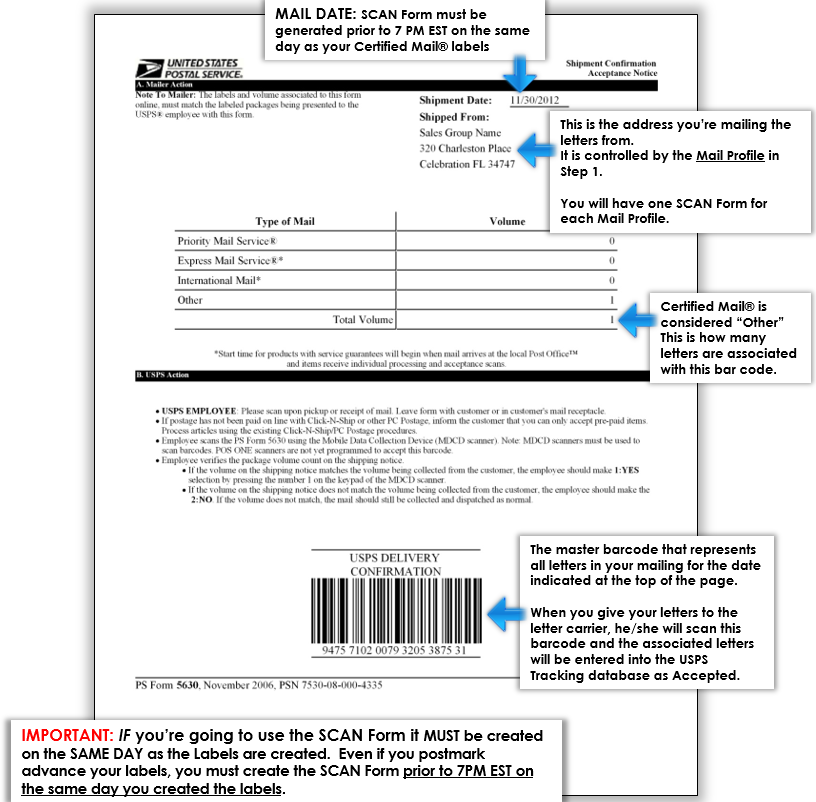
USPS Form PS 5630 is commonly referred to as a SCAN Form, which stands for Shipment Confirmation Acceptance Notice. It contains one large barcode connected to multiple mail pieces in a shipment.
When USPS scans the SCAN Form barcode, the scan can activate tracking for all associated mail pieces included in that shipment. This creates an official USPS acceptance event showing the date and time USPS received the mail.
A SCAN Form is commonly used for:
- USPS Certified Mail
- Priority Mail
- Priority Mail Express
- High-volume mailing batches
- Compliance mail workflows
- Business mail operations
For businesses that depend on proof of mailing, the USPS SCAN Form can play an important role in documenting when mail entered the USPS system.
Why the USPS SCAN Form Matters
For compliance-driven organizations, proof of mailing is often just as important as final delivery confirmation.
The SCAN Form helps document that USPS accepted the mail pieces into the mail stream. This acceptance event may show the date, time, and USPS location associated with the mailing.
Organizations often rely on this documentation for:
- Legal notices
- IRS and tax correspondence
- Tenant communications
- Collections letters
- Financial disclosures
- Healthcare notifications
- Regulatory mail
- High-volume Certified Mail batches
When deadlines or compliance requirements are involved, documented USPS acceptance can help support audit readiness, internal reporting, and legal documentation.
How the USPS SCAN Form Works
A USPS SCAN Form allows multiple mail pieces to be accepted with one barcode scan.
Instead of scanning each individual mail piece separately at the time of acceptance, USPS can scan the SCAN Form barcode. That scan connects to the mail pieces listed under the form and records the shipment as accepted by USPS.
This helps streamline the mailing process for businesses sending multiple Certified Mail letters or other USPS-tracked mail pieces.
For high-volume mailers, this can reduce delays at the Post Office while creating a more organized acceptance record.
USPS Acceptance Scan vs. Delivery Confirmation
The USPS Acceptance Scan and delivery confirmation are different stages in the mailing process.
The Acceptance Scan confirms that USPS received the mail piece and accepted it into the mail stream.
Delivery confirmation shows that USPS delivered the mail piece to the recipient or completed the delivery event.
Both records are valuable, but they serve different purposes. The Acceptance Scan helps support proof of mailing, while delivery confirmation helps support proof of delivery.
For many compliance communications, businesses need both records to maintain a complete mailing history.
SCAN Forms for High-Volume Certified Mail
The SCAN Form is especially useful for organizations sending multiple mail pieces at once.
Businesses that manage high-volume Certified Mail often need a streamlined way to document USPS acceptance for large batches of mail.
This includes organizations such as:
- Law firms
- Financial institutions
- Property management companies
- Healthcare organizations
- Collections departments
- Government agencies
- Tax professionals
- Enterprise operations teams
For these organizations, the SCAN Form can help improve mailing efficiency while supporting compliance documentation and operational reporting.
How Send Certified Mail Helps
Send Certified Mail is built for businesses that need reliable mailing, tracking, and documentation without manual Post Office workflows.
With Send Certified Mail, users can upload documents online while our platform handles printing, mailing, USPS tracking, reporting, and long-term record storage.
For organizations that send compliance mail, legal notices, or high-volume USPS mail, this helps reduce manual workload while improving visibility into proof of mailing and proof of delivery documentation.
Send Certified Mail helps users:
- Send USPS Certified Mail online
- Access USPS tracking and delivery confirmation
- Retrieve proof of mailing documentation
- View Electronic Delivery Confirmation Reports
- Access Return Receipt Electronic Signature Reports
- Store records securely for up to 10 years
- Reduce trips to the Post Office
Why Businesses Use Send Certified Mail for Acceptance Documentation
Traditional mail workflows often require employees to manually prepare mail, generate forms, organize receipts, and manage Post Office acceptance.
This process can be time consuming, especially for organizations sending large batches of Certified Mail or compliance communications.
Send Certified Mail helps businesses centralize the mailing process online while maintaining access to USPS tracking and reporting records.
 For businesses that need documentation, organization, and mailing visibility, Send Certified Mail provides a more efficient alternative to manual mailroom processing.
Get Started Today
Send Certified Mail helps businesses send, track, and document USPS Certified Mail, First-Class Mail, Priority Mail, and compliance communications online.

Create a free account or schedule a free Live Demo with our Customer Support Team to see how Send Certified Mail can streamline your mailing and reporting workflow.